
Adobe InDesign remains one of the most widely used tools for producing magazines, books, catalogues and technical documentation. While it’s an excellent platform for creating print-ready layouts, organisations increasingly need to reuse that same content across websites, mobile devices, ebooks and content management systems.
Converting InDesign documents into digital formats isn’t simply an export process. It requires careful handling of document structure, assets, metadata and formatting to ensure content works effectively across multiple channels. When approached correctly, the same source content can support print, web, mobile and digital publishing workflows without unnecessary duplication.
After years of developing InDesign-based publishing solutions, we’ve learned that successful projects depend less on the conversion itself and more on the quality and structure of the original content.
Start with a well-structured InDesign document
A successful conversion begins with a good structure.
Before any content is transformed, it’s important to understand how the original InDesign document has been built. Well-structured documents are significantly easier to convert than layouts that rely on extensive manual formatting.
Key elements to review include:
- paragraph and character styles
- master pages
- tables and table styles
- anchored objects
- XML tags
- consistent naming conventions
- document hierarchy and structure.
Using styles consistently instead of manual formatting creates logical content that can be recognised and transformed automatically. The more structured the source document, the more reliable and repeatable the conversion process becomes.
Extract content and assets efficiently
Digital publishing involves much more than exporting text.
Images, graphics, tables, captions, metadata, hyperlinks and cross-references all need to be extracted and preserved correctly. Depending on the destination platform, these assets may need to be renamed, resized, converted or reorganised before they can be published.
For organisations managing hundreds or thousands of documents, these repetitive tasks quickly become time-consuming and prone to human error.
This is where automation delivers significant value. Rather than processing each document manually, automated workflows can extract assets, validate files, reorganise folder structures and prepare content for the next stage of publishing with consistent results.
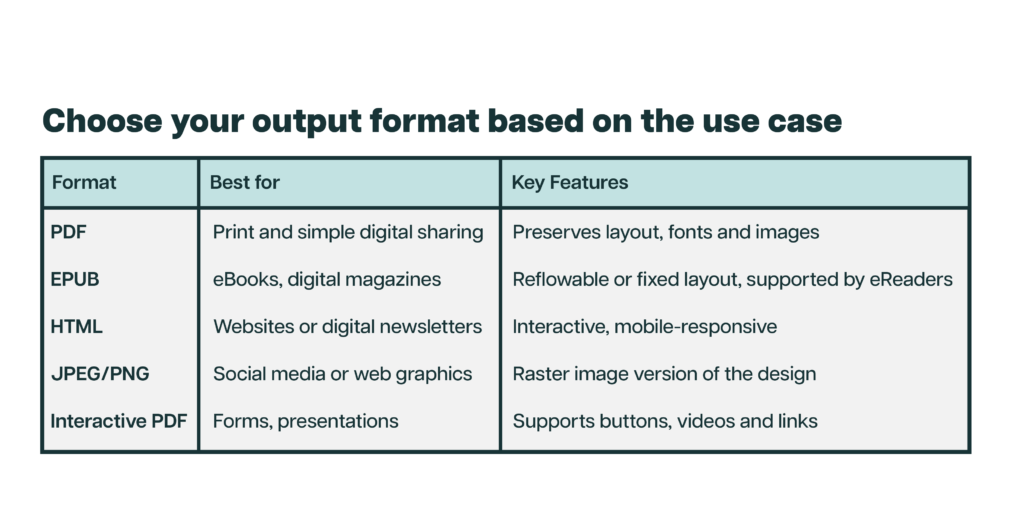
Choose the right output format
The best output format depends on how your audience will consume the content.
Rather than choosing a format based on technical preference, organisations should start with the business objective. A product catalogue, technical manual and marketing brochure may all originate in InDesign, but each has very different publishing requirements.
Preserve the structure, not just the appearance
One of the most common misconceptions about digital publishing is that success means recreating every detail of the printed page.
In reality, effective digital publishing focuses on preserving the meaning and structure of the content rather than every visual detail. Headings, lists, tables, captions and references should remain logically organised so they can adapt to different screen sizes, devices and platforms.
A responsive website, for example, doesn’t need to look identical to a printed brochure: it needs to deliver the same information in a way that’s easy to read and navigate.
Automation makes digital publishing more efficient
Many stages of the conversion process can be automated, saving significant time while improving consistency.
Depending on the publishing workflow, automation can help with:
- extracting images and linked assets
- renaming files using consistent rules
- converting XML into structured content
- validating document structures
- generating metadata
- publishing directly into content management systems
- creating EPUB and other digital formats
- reorganising folders and file structures.
Purpose-built automation reduces manual effort, eliminates repetitive tasks and produces consistent output every time. It also makes publishing workflows easier to scale as document volumes grow.
Test before publishing
Before content is published, it’s important to validate both the technical quality and the user experience.
Testing should include:
- accessibility compliance
- responsive layouts across different screen sizes
- browser compatibility
- EPUB validation
- hyperlinks and navigation
- image quality and optimisation.
A thorough testing process helps ensure the final publication delivers a consistent experience regardless of how or where users access it.
Common challenges when converting InDesign files
Every project is different, but some challenges appear repeatedly.
Common issues include:
- inconsistent use of paragraph and character styles
- missing or outdated linked assets
- complex tables and nested content
- legacy documents created over many years
- fonts that don’t translate across platforms
- interactive elements that require rebuilding
- large document collections with varying standards
- manual publishing workflows that don’t scale.
Addressing these issues early significantly reduces the complexity of the conversion process.
Unlock more value from your content
Converting InDesign files isn’t simply about changing formats. It’s about preserving valuable content while making it reusable across multiple channels.
With the right document structure, automation and publishing workflow, organisations can reduce manual effort, improve consistency and get far more value from the content they already produce.
Whether you’re publishing technical documentation, magazines, catalogues or product information, a well-designed conversion process makes it possible to move beyond print without rebuilding content from scratch.
At Timehouse, we help organisations modernise their publishing workflows by combining structured content, automation and custom software development. The result is faster publishing, fewer manual tasks and content that’s ready for wherever it needs to go next.